Business is becoming increasingly dynamic, and intuition-based management no longer works. Customers expect quick and accurate decisions, and teams need transparent and efficient processes. A CRM system creates a solid foundation where customer understanding and internal process organization work in sync, ensuring the company's sustainable development.
What is a CRM system in simple terms, how does it work, what types exist, and what advantages and features does the system have, as well as what is the difference between CRM and ERP — all this is covered in our longread.
What is a CRM management system?
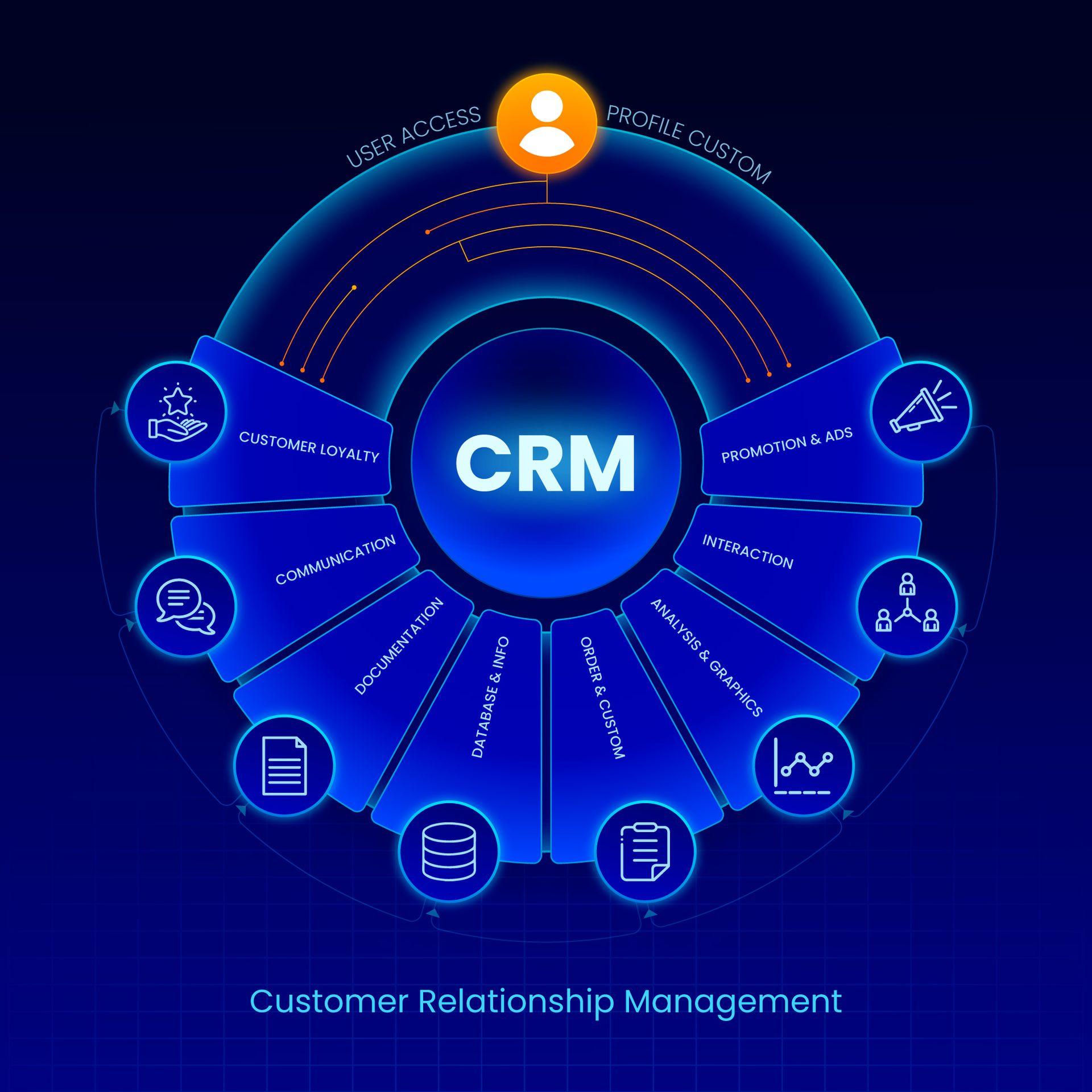
A CRM (Customer Relationship Management) is a system that helps a company manage all interactions with customers and potential buyers in an all-in-one tool. It combines data on contacts, inquiries, transactions, purchases, and communications and updates them automatically.
CRM records every contact with a customer, such as a request from a website, a call, a letter, a message on social media or chat, etc., and stores the complete history of interactions in a single database. This allows managers to work according to uniform rules, and management to see the full picture of sales and team workload. CRM software also allows businesses to better understand customer behavior, segment their audience, personalize communications, and increase sales efficiency.
Why do your businesses need CRM?
Many entrepreneurs perceive CRM as “additional software.” In fact, the system is one of the most effective tools for business growth. Research for 2025-2026 shows that CRM implementation yields results:
- According to Salesforce, CRM programs increase sales by 29% and forecast accuracy by 42%.
- HubSpot's “The State of Customer Service” report confirms that companies using integrated CRM solutions have a 27% higher customer retention rate.
- Grand View Research's report on the CRM market size (Customer Relationship Management Market Size & Share) shows that over 91% of companies with more than 10 employees use CRM.
- A Gartner report describes the implementation of generative AI as a trend for 2025-2026 that reduces routine time by 30-40%.
- In terms of ROI, businesses earn an average of $8.71 for every $1 spent on CRM, according to Nucleus Research.
How does CRM work? Key features
CRM implementation for business works like a digital assistant that organizes teamwork and automates routine processes.
Key features of a CRM system:
- Centralized customer data management.
- Contact tracking and activity history.
- Sales pipeline and forecasting.
- Marketing and sales automation.
- Analytics and artificial intelligence.
- Team collaboration.
- Integration with other systems.
- Additional features, including contact center automation, chatbots, geolocation services, HR and project management, mobile access, and offline operation.
Using CRM, the team can predict customer needs, optimize processes, and improve efficiency. At the same time, it improves the customer experience across all channels of interaction.
Learn more about How is financial automation changing the role of CFOs and finance teams?
Which business should implement CRM solutions in their business?
Thanks to the implementation of the system, the business will build strong relationships with customers and increase sales. Various types of companies appreciate its value.
A CRM programs is the ideal choice for:
- B2B companies, where deals last from a week to several months and it is important not to miss a single stage of negotiations.
- E-commerce. CRM for online stores helps manage large order flows, synchronize inventory, payments, and delivery, ensuring smooth operation.
- Service industries, such as beauty salons, medical centers, CRM for educational institutions and courses, etc. The system organizes customer records, maintains a contact database, and controls reminders so that no customer is overlooked.
- Real estate CRM and for auto businesses, where losing a single lead can mean significant financial losses. The platform tracks all potential deals and priorities for the sales team.
- Marketing department, where the team gets a tool for accurately tracking campaign effectiveness, analyzing advertising ROI, and optimizing the budget.
The implementation of a CRM system transforms business management into a predictable and controllable process, increasing the efficiency of resource use, the level of customer service, and the company's financial performance.
Advantages of CRM
This digital tool creates a complete customer profile, allowing businesses to organize, centralize, and analyze customer information. The main benefits of a CRM system for businesses are:
- Consolidation of all customer data in one place, including purchase history, orders, support requests, and marketing interactions.
- Saving time and money spent on manual work. Data entry, letter writing, report generation, and lead tracking are automated. Information is stored even after staff changes, protecting the business from data loss.
- Improved customer service through personalized offers and quick responses.
- Built-in reminders and automated actions speed up the deal approval process, help prioritize, and avoid delays.
- Coordinated teamwork avoids confusion, duplication of effort, and oversights.
- Real-time analytics and dashboards. The system provides up-to-date metrics: deal speed, lead conversion, win rate, and customer churn risk.
- Automation of routine processes such as sending emails, generating proposals, and reminders. You create the process once, and the system executes it at scale.
- Predicting customer behavior. AI-powered CRMs analyze past data to predict which deals are more likely to close and which customers are at risk of losing interest.
- Scalability and flexibility — CRM platforms grows with your business.
- CRM configuration increases customer retention, reduces re-engagement costs, and accelerates sales. The company gains complete control over revenue and the ability to make informed decisions about marketing investments and product development.
Benefits for different parties of CRM tools:
- For the owner – business transparency, control over income and team activity, protection of the customer base.
- For managers – less chaos, quick access to customer history, automation of routine tasks.
- For customers – personalized service, quick response to requests, no repetition or delays.
Companies increase customer satisfaction and retention, making the system a valuable investment that pays for itself from day one.
We recommend to read Odoo or NetSuite: Which Fits Your Growth?
Types of CRM
CRM solutions differ in functionality, hosting, specialization, and source code type. The choice will depend on the needs and goals of the business, as well as the size of the company. Let's take a look at all types of CRM.
By functionality (purpose)
- Operational CRMs automate daily tasks such as collecting contacts, managing deals, and invoicing. They are ideal for sales departments.
- Analytical CRMs process large amounts of data to analyze customer behavior, assess profitability, and optimize the sales funnel. They are used by marketers and analysts.
- Collaborative CRMs enable effective communication with customers and data exchange between departments to create a seamless customer experience. They are suitable for large service companies.
By data storage method
- Cloud-based (SaaS). Data is stored on the developer's servers and can be accessed from any device. Pros: quick start, automatic updates. Cons: monthly subscription fee and dependence on the internet.
- Boxed (On-premise). The program is installed on the company's own server. Pros: full control over data, possibility of deep customization. Cons: need for own servers and IT support.
By specialization (industry solutions)
- Universal CRMs are suitable for most businesses and offer flexible settings.
- Industry CRMs are designed for the specifics of a particular business.
By source code type
- Closed Source – commercial products with unchangeable code.
- Open Source CRM allows you to adapt the code to your own needs, but requires a strong team of developers.
CRM by business size and needs
- CRM for startups and small businesses for team organization, lead systematization, etc.
- Medium-sized businesses get coordinated sales and marketing, deal tracking, and complete customer history.
- In large companies and corporations, the system supports complex sales cycles, global teams, and multi-level service processes.
Tip: Cloud-based universal CRMs are better suited for small or medium-sized businesses due to their speed of launch, affordability, and lack of need for programmers.
CRM vs ERP: what is the difference?
It is important to distinguish between CRM and ERP, as these are two different systems with different functionalities. For a company owner, the difference lies in the focus of the system — what it is designed to do. Let's take a closer look.
A CRM system is a tool for working with customers. It helps attract new buyers, sell to them, and so on. In essence, it is your front office.
ERP (Enterprise Resource Planning) – a system for managing a company's internal resources. It keeps track of money, goods in stock, and employee working hours to ensure that everything runs as efficiently as possible. It is your back office.
A simple table for comparing CRM and ERP
Sign | CRM | ERP |
Focus | The customer and their needs | The company and its resources |
Main goal | Increase sales (Front-end) | Reduce costs and optimize resources (Back-end) |
Users | Salespeople, marketers, service managers | Accountants, logisticians, HR, production workers |
Key data | Call history, deal stages, chats | Inventory, cost price, salaries |
When is it needed? | When it's important not to lose leads and increase sales | When processes become too complex for Excel |
Don’t miss it Investment or Expense? A CEO’s Guide to ROI of ERP
How much does CRM cost?
The cost of CRM depends on business needs, the number of users, and how deeply you want to integrate the system into your business processes. There are free and open-source options that do not require financial investment, and there are CRM systems that cost thousands of dollars per month. First and foremost, it is important to understand what you are paying for and whether your business really needs it.
CRM pricing models:
- Fee per user/month. The tariff provides for usage depending on the number of active users. Basic packages start at $10 to $30 per user, and advanced packages start at $100 and above for additional features.
- Pricing for multi-level plans depends on the set of features. Some CRM systems have three or more levels. For example, basic email synchronization may be free, while artificial intelligence, advanced reporting, or automation are only available at higher levels.
- Payment per module or feature, which is convenient for limited budgets or specific processes. This is more common with open or industry-specific CRMs.
In addition to the subscription, it is worth considering the total cost of ownership (TCO), namely:
- Configuration and adaptation of the system to business processes, creation of custom fields and automations.
- Tools for data migration and cleansing.
- Team training and support.
- Additional applications, integrations, and services, such as forms or ERP connections.
Remember! Even free CRM requires time and resources for proper implementation, so it is important to evaluate the costs of launch and support.
Popular CRM systems: examples
There are solutions for automating sales, marketing, and customer service on the global market. Among the most well-known are:
Odoo CRM – part of the international ERP platform Odoo, which integrates CRM with all business processes. Odoo stands out for its flexible settings and the ability to work both in the cloud and locally, making it convenient for companies of all sizes.
Salesforce is one of the world leaders in CRM, offering a comprehensive platform for B2B and B2C businesses. It is known for its powerful analytics tools, sales and marketing campaign automation, and integration with hundreds of applications.
HubSpot CRM is a popular CRM for small business and medium-sized businesses that allows you to start building a customer base for free and gradually connect additional marketing and analytics tools. HubSpot is valued for its ease of use and quick setup.
Zoho CRM is a flexible and cost-effective solution suitable for businesses of all sizes. Zoho offers process automation, analytics, and a set of integrations with financial and marketing services.
Microsoft Dynamics 365 is a solution for large corporations and global teams that combines CRM and ERP functionality. Microsoft allows you to build comprehensive sales and service processes.
Each of these systems has its own advantages, and the choice depends on the scale of the business, industry specifics, and automation goals. For example, for companies that want to combine sales management with other business processes, Odoo CRM is a particularly attractive solution thanks to its integrated ecosystem and customization options.
What features should you pay attention to? CRM technology in 2026
CRM is already a tool that truly facilitates teamwork, provides important insights, and helps make decisions faster. To ensure that the system remains effective for years to come, evaluate your CRM options based on the following capabilities:
- Artificial intelligence and machine learning. The best CRM for business identifies the hottest leads, flags accounts at risk of churn, and suggests next steps based on what has already worked.
- No-code automation — set up email sequences, reminders, or customer journeys without a developer. Intuitive drag-and-drop builders let you automate routine tasks in a few clicks.
- Integrations with other services such as Gmail, Slack, Zoom, Stripe, QuickBooks, and other systems.
- Mobile access and working outside the office — full access to CRM even offline, so that any team can work without restrictions.
- Predictive analytics to anticipate events and respond in a timely manner, plan the team's next steps, and more.
- Customizable dashboards and reports with real-time updates and the ability to export reports.
If CRM for businesses doesn't save you time, doesn't let you understand what works, and doesn't grow with your team, it won't help you.
Continue reading 2025-2026 US ERP Market Analysis: Trends, Adoption, and Growth Forecast
The future of your business in numbers and systems
CRM implementation ensures the transition from intuitive management to digital management, where every interaction with a customer, every contact, and every transaction is financed. A CRM system gives the owner confidence that the business is under control and that processes are completely transparent. In 2026, the absence of CRM in a business that works with people looks as unnatural as a manager not having a cell phone.
But it's not worth waiting for the “perfect” system or spending hours choosing “the one.” Start with the basics, such as automating the sales funnel, consolidating your customer base, and getting rid of routine tasks. Even the simplest CRM is definitely more effective than complex Excel spreadsheets.
